What Is Clickfix and Its Role in Cybersecurity?
Imagine this: You’re innocently browsing, and suddenly a “Prove you’re not a robot” pops up.
You think, “No big deal,” click a few boxes… and boom—your computer just invited malware to the party.
Welcome to the world of social engineering attacks in 2025, where cybercriminals are basically pranksters with PhDs in psychology.
These scams manipulate your brain faster than a bad magic trick, using fake CAPTCHAs that harvest data or phony Windows update screens that sneak in malware.
Spot them early, and you’ll protect your info and devices from these digital scam artists.
Then there’s clickbait—the internet’s guilty pleasure. Those “You won’t believe what happened next!” headlines lure you straight to viruses or phishing traps.
In 2025, tricks like ClickFix reCAPTCHA impersonate legit tools to run nasty commands.
Knowledge is your superpower: Learn these evolving threats, and you’ll dodge them like neo in the matrix.
This guide breaks down social engineering tactics, plus practical tips to beat fake CAPTCHAs, fake update alerts, and clickbait.
Stay safe amid the cyber chaos—because getting hacked isn’t funny (okay, maybe the scammers’ fails are).
Key Takeaways
- Spot common social engineering tricks before they steal your data.
- Laugh off fake security prompts and malicious “updates.”
- Master strategies to ignore clickbait and advanced scams.
Understanding Social Engineering Attacks
Social engineering skips the fancy hacks and goes straight for your weak spot: being human.
It’s like a con artist sweet-talking you into trouble—tricking you into spilling secrets or clicking doom.
Using human psychology against, they trick you into giving up your information and handing over your device without you even knowing about it—Like taking candy from a baby.
Types of Social Engineering Techniques
Cyber crooks have a whole bag of tricks. Some of them are:
- Phishing: Fake emails or messages pretending to be someone you know or a trusted source.
- Pretexting: Posing as tech support or authority figures.
- Baiting: Dangling “free” goodies loaded with malware.
- Tailgating: Sneaking into buildings behind you (old-school but effective).
And now the new favorites? Fake CAPTCHAs and Fake windows pop-ups that look legit but scream “trap!”
Psychological Manipulation Tactics
Attackers poke at fear, trust, curiosity, or urgency.
- A fake virus alert? Panic mode activated.
- Impersonating your CEO? Instant obedience.
- They even use reciprocity—”I helped you, now help me.”
Spot these mind games, pause, and verify. Don’t let emotions hijack your mouse!
Identifying Human Vulnerabilities
We’re all suckers for curiosity (hello, clickbait!) or trusting big brands.
Frustrated with real CAPTCHAs? Scams like ClickFix exploit that rage.
Rushing through tasks? Perfect opening. Know your habits, and you’ll slam the door on unsolicited nonsense.
Current Cyber Threats in 2025
Social engineering fuels over a third of breaches, supercharged by AI making fakes scarily real.
Fake CAPTCHAs, bogus updates, and clickbait reign supreme in the modern digital landscape.
You’ll understand what to look for, how to prevent and even avoid these attacks coming up.
Emerging Trends
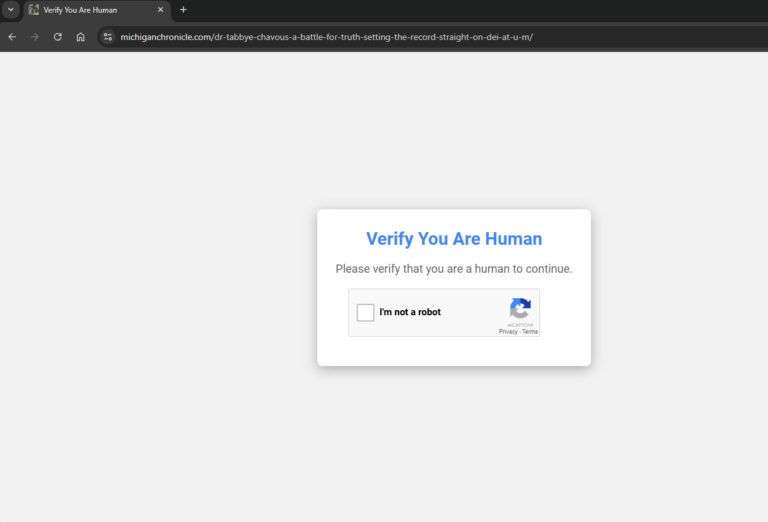
ClickFix and ClearFake campaigns dominate, hijacking clipboards with fake CAPTCHAs to run malware.
Clickbait? Sensational headlines leading to drive-by disasters.
Some of the red flags to look out for are: Typos, weird URLs, or “Act NOW or else!” – Urgency, curiosity, fear, and trust is what fuels most of the phishing campaigns nowadays.
Evolving Malware and Phishing
Phishing hits SMS, social media, and fake profiles. Malware lurks in branded “updates.” Fight back with MFA and off-channel checks.
Impact of AI on Attack Sophistication
AI crafts deepfakes and personalized traps—blurring lines between real and fake. Be paranoid with unsolicited stuff; use AI detectors and stay educated.
If it’s an unknown number let it ring off, if it’s urgent they’ll leave a voice message.
If you do answer, ensure you say minimal or nothing until the other person speaks first.
This increases the chances of your voice not being recorded and used in AI voice cloning scams.
Methods for Reducing Social Engineering Risks
Beat the bad guys with training, verification, and tech shields.
Employee Security Awareness Training
Regular fun sessions on phishing, fake CAPTCHAs, and pop-ups. Simulations + trigger talks = a team that questions everything and a secure environment.
Staying up to date with what’s happening in the digital threat landscape, scams, and attacks will also ensure awareness when – not if – you’re hit with an attack.
Verification and Authentication Strategies
You’ll hear this quite a lot throughout this post. If in doubt, verify.
- Double-check via known contacts.
- Set strong passwords—16+ characters with numbers, upper case, lower case, and symbols in it.
- Change your passwords regularly—use a password manager.
- Add security filters and MFA methods—keep accounts secure and junk away.
By doing this, you increase your chances of being a victor rather than a victim of these social engineering attacks.
Fake CAPTCHA Attacks – ClickFix reCAPTCHA and Security Implications
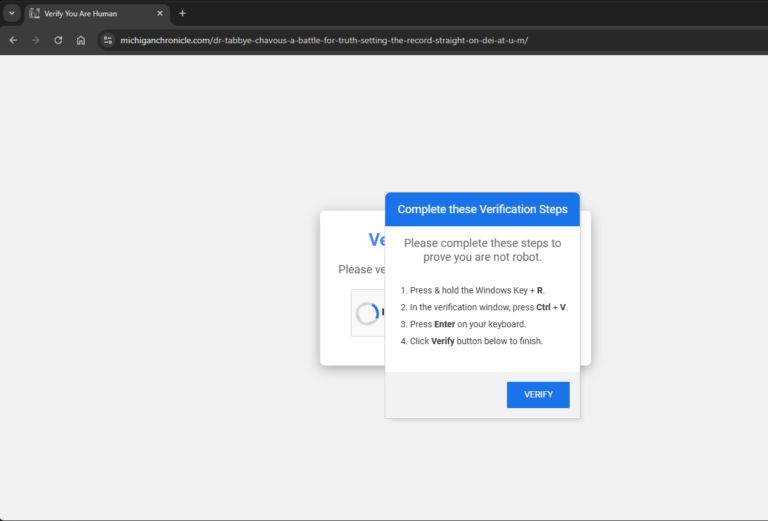
ClickFix pretends to be Google’s reCAPTCHA, begging you to paste evil PowerShell.
These imposters mimic verifications to install malware—sneaky bastards!
What It Is and How They Work
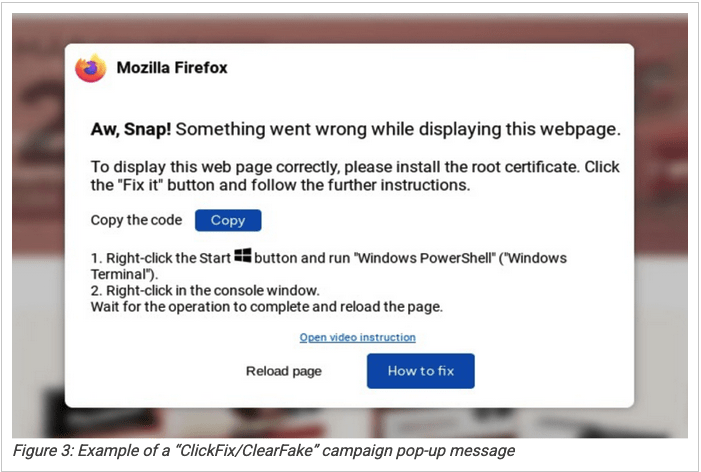
Compromised sites trigger clicks and/or pastes that unleash info-stealers and malware droppers (hello, ClickFix!).
The group SoCGholish are responsible for this Clickfix(Fake CAPTCHA) and fake windows update attacks.
They compromise legitimate websites by altering and adding their malicious DNS to the sites name servers and DNS records.
You could be browsing your local barber/hairstylist website looking to book an appointment.
Then suddenly BOOM! the “Please Verify You’re a Human” Captcha hits your screen.
Impatient to get back to your task at hand you click the little check box button. A screen pops up asking you to copy a verification code to your run box.
You follow what it asks you to do, return to your web browser and…nothing changes?!?
No redirect, no change in the page… Just a loop of the same page. What the hell?!
What just happened is you unknowingly copied a malicious code and ran it on your computer.
This code then goes to the bad guy’s server and downloads malware onto your device and executes it.
All of this happens in the background while you are unaware and try get back to booking your hair appointment. (Told you they’re sneaky)
This works by exploiting humans’ haste and hatred for captcha verification’s: The copy paste runs malware quietly.
Key Vulnerabilities
Trust + CAPTCHA frustration = self-sabotage.
Because you are on a site you already trust, you rarely if at all question the legitimacy of what is happening.
You just want to get whatever it is done so you can move on to the next thing—guilty.
Genuine vs. Fake
Real CAPTCHA’s never demand pastes, require you to interact with the Run box, or disable security tools. Always verify the URL—always!
If in doubt, exit the page and go back to it.
Fake Windows Update Schemes
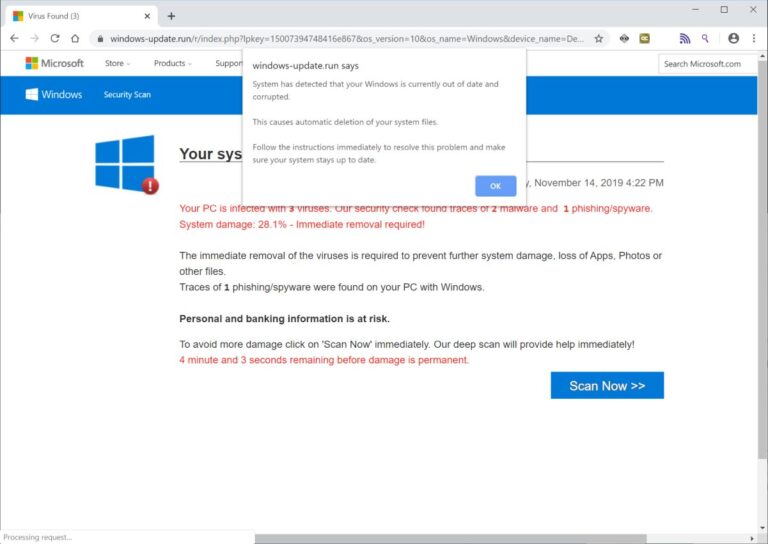
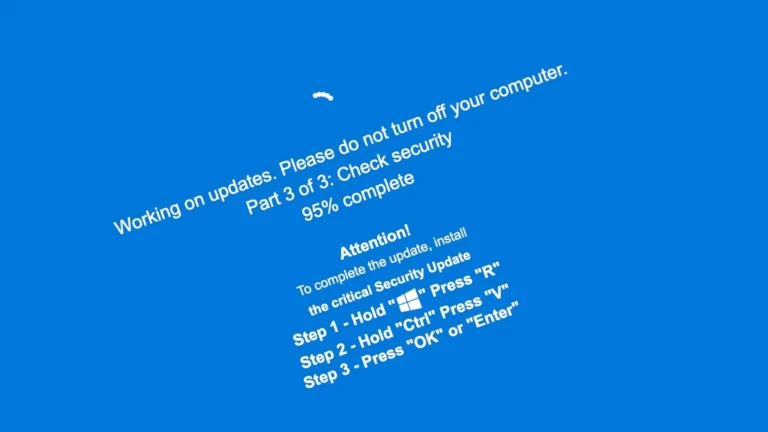
Pop-ups faking system alerts? Classic malware delivery.
Tactics and Risks
Urgent “vulnerabilities” + key combos to run payloads.
Using fear, urgency and other psychological techniques. Attackers are able to get you to perform actions that compromise your device, and information.
This leaves you open to credential theft, ransomware, network takeover and much more—yikes.
Prevention
Update via Settings only. A good antivirus + scrutiny + always verify = safe browsing and peace of mind.
A legit windows or system update will never tell you your systems out of date via the web.
Always check by going to your systems settings and seeing if you need to update it from there.
Recognizing Malicious Pages
Unexpected? Asks for downloads? Bad design and/or grammar? Asks you to paste something on your device? Legit ones are simple—no extras.
Common Signs
- Endless loops.
- Credential demands.
- Urgent “fixes.”
- Typos galore.
- Requires actions to be performed on the device itself.
If any of the above happen, Close the tab, scan your device—stat!
Always verify the URL and ensure it’s the correct URL for the site you are wanting to view.
Again, if in doubt VERIFY!
Clickbait and Its Consequences
Headlines that scream “Shocking!” to deliver threats.


What It Is
Overhyped promises redirecting to danger.
These websites use human nature against you to infect your system and steal your information—not good!
If you are tempted to click on an article or click to “read more” then go to the website page itself and find the article there.
If it’s legit you’ll see it on the actual website.
If not, you just beat the bad guys at their own game—woohoo!
Techniques
Fake thumbnails, urgency, branded bait—often chaining to CAPTCHAs.
Using persuasion tactics and mind games. Like a magician misdirecting you by using your own psychology against you to pull a rabbit out of a hat.
These clickbait articles/sites use psychological triggers to get you to click, input information, and/or take action if you aren’t aware (Slippery lil’ snakes aren’t they).
Malware Connection
Drive-by infections galore. Hover, block ads, update software.
This leads to something known as drive-by malware.
Once you click on the page, you go through multiple redirects and ads. While dealing with this chaos, a file is downloaded and executed onto your device.
To avoid this, before clicking, hover over whatever it is you’re intrigued about and look at the URL.
If it looks phishy, it probably is—TIP: you can always copy and paste the link in a sandbox environment. Browserling is one where you can safely view the URL for free before going to it on your actual device.
Get yourself an ad blocker and ensure your browser is up to date. This will drastically improve your chances of staying safe and secure.
Conclusion
The digital world is an amazing place. We live in an age with information and technology we have never seen before. Opportunities are endless!
This wasn’t about inserting fear but making you aware of what is out there.
By
- Staying up to date—Latest threats, attacks, and vulnerabilities going on.
- Always verifying—Sources, URLS, and websites.
- Keeping things updated—Browsers, applications, passwords, and systems.
- Understanding the tactics used—Psychological tricks, emotional triggers, and persuasive techniques.
You can safely browse this amazing digital landscape without fear but confidence knowing you’re one step ahead like a chess grandmaster.